
How to Apply a Coupon Code
- Add the items you want to your cart.
- Go to your Shopping Cart or proceed to Checkout.
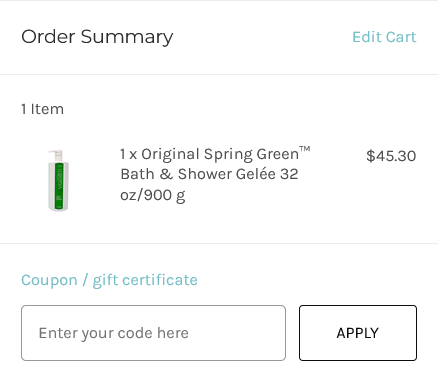
- Enter your coupon code exactly as it appears in the “Coupon Code” field.
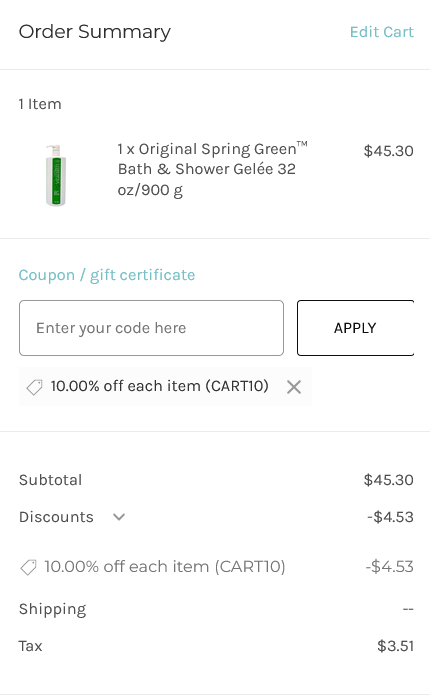
- Click Apply. Your discount will appear in the order summary.
Please review images below to see examples where this field is and what it should look like after applying the code. If you receive an notice that the code you have is no longer valid - please contact us if you feel this is in error and we will assist further.
Important Notes:
- Only one coupon code can be used per order. Entering a second code will replace the first.
- Coupon codes must be entered at the time of purchase and cannot be applied to previous orders.
- Some codes may have expiration dates or minimum purchase requirements.
Free Shipping & Coupon Codes
Free shipping is automatically applied to orders of $65 USD / $80 CAD or more (before tax).
If a coupon code brings your order total below the free shipping threshold, standard shipping charges will apply. Consider adding a travel-size product to reach free shipping — you can browse our Travel Size collection here.
Need Help?
If you’re having trouble applying a coupon code, please email us at support@vitabathinc.com and we’ll be happy to assist.
EXAMPLE images of what your code should look like before and after entry: